Sign up for our Monthly Newsletter!
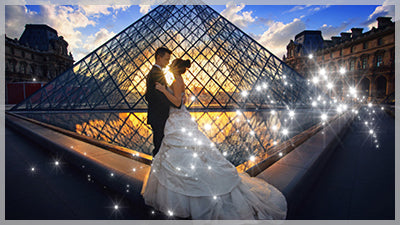
This is a single Slide Style, for any version of ProShow Producer. You can change the color of the Sparkles by changing the color of the Solid La...
View full detailsIntermediate Level This tutorial is included in the Volume 4 Series In this tutorial you'll learn how to create better quality DVDs. This tutorial...
View full detailsIntermediate Level This tutorial is included in the Volume 4 Series In this tutorial you'll create a Post Card Transition and learn how to save the...
View full detailsIntermediate Level This tutorial is included in the Volume 4 Series In this tutorial you'll learn how to create continuous motion over multiple sli...
View full detailsIntermediate Level This tutorial is included in the Volume 4 Series In this tutorial you'll create the Parallax Effect seen in both of the Parallax...
View full detailsIntermediate Level This tutorial is included in the Volume 4 Series In this tutorial you'll learn how to use the Keyframe Editor to fade photos ove...
View full detailsThis is a downloadable bundle of the 3rd set of 8 videos in the ProShow Training Series. Each video is also available as an individual download: ...
View full detailsIntermediate Level This tutorial is included in the Volume 4 Series In this downloadable tutorial you'll create the Inner Line Effect seen in the H...
View full detailsThis is a single Slide Style for ProShow Producer. Want to learn how to create this yourself? You can purchase the Tutorial AND Slide Style ri...
View full detailsThis is a single Transition for ProShow Producer. Want to learn how to create this yourself? You can purchase the Tutorial AND the Transiton r...
View full detailsThis is a single Slide Style for ProShow Producer. Want to learn how to create this yourself? You can purchase the tutorial AND Slide Style ri...
View full detailsThis is a single Slide Style for ProShow Producer. You can use either a Tall or Wide photo with this Style, as the photo is behind a mask. Want ...
View full detailsThis is a single Slide Style for ProShow Producer. You can use either a Tall or Wide photo with this Style. Moved up to Photopia? Click here to v...
View full detailsThis is a single transition that is compatible with ProShow Producer, any version. Want to learn how to create this Transition, and variations of ...
View full detailsThis Slide Style comes with both Gold and Producer files, Version 9 only.
This is a pack of 20 Slide Styles and 10 Transitions for ProShow Producer 9.A tutorial is included, but these are very easy to use!
Beginner Level This tutorial is a part of the ProShow Training Series Volume 3 In this tutorial you'll learn how, and why, to create a Project. You...
View full detailsIntermediate Level This tutorial is a part of the ProShow Training Series Volume 3 In this downloadable tutorial you'll create a Circle Masked Titl...
View full detailsIntermediate Level This tutorial is a part of the ProShow Training Series Volume 3 In this downloadable tutorial you'll learn how to create a ProSh...
View full detailsIntermediate Level This tutorial is a part of the ProShow Training Series Volume 3 In this downloadable tutorial you'll create a Rose Reflection Sl...
View full detailsBeginner Level This tutorial is a part of the ProShow Training Series Volume 3 In this downloadable tutorial you'll learn how to add accented chara...
View full detailsBeginner Level This tutorial is a part of the ProShow Training Series Volume 3 In this downloadable tutorial you'll create an Double Circle Transit...
View full detailsIntermediate Level This tutorial is a part of the ProShow Training Series Volume 3 In this tutorial I'll show you how to upload a Video Cover to yo...
View full detailsIntermediate Level This tutorial is a part of the ProShow Training Series Volume 3 In this downloadable tutorial you'll create an animated Musical ...
View full details